Compound & Nested Codes
Compound and nested codes build new codes from the ones in your data, so a model can tell apart concepts that overlap.
- A compound code (A & B) is present on a line when both A and B are. Use one when the combination means something different from either code alone.
- A nested subcode (B ⊆ A) marks B as a more specific kind of A. Use one when a code is a sub-category of another, so the general code's connections aren't counted again through the specific one.
To open the editor, click the Compound & Nested Codes icon (a forked arrow) on the Codes tab, or Manage Derived Codes in Advanced Options. It has a tab for each kind. Set up your rules, then click Apply & Rebuild to rebuild the model with them. An Active badge on the Manage Derived Codes button shows that derived codes are in use.
Compound codes (A & B)
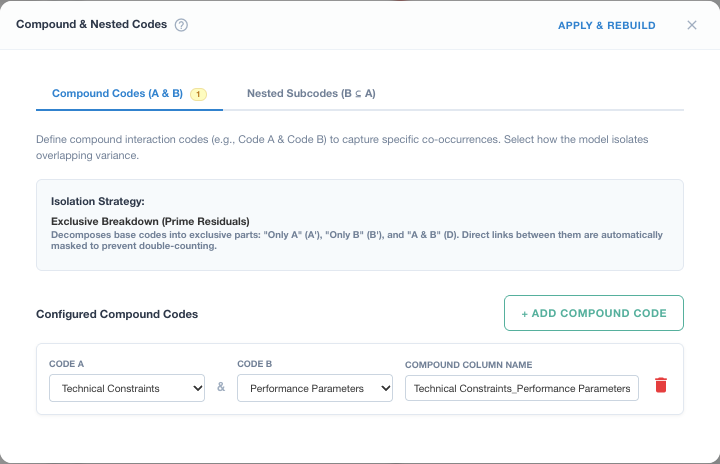
- On the Compound Codes tab, click + Add Compound Code.
- Choose Code A and Code B.
- Optionally rename it in Compound Column Name. The default is
A_B_Derived. - Add more compound codes the same way, then click Apply & Rebuild.
A compound code is present on a line when both of its codes are present (any value above 0). Like the other codes made here, it is always 0 or 1, even when the Codes tab uses numeric values.
Exclusive Breakdown
With the isolation strategy Exclusive Breakdown (the default), A and B are split into parts that never overlap:
- A_Prime (A′): lines with A but not B;
- B_Prime (B′): lines with B but not A;
- A & B: lines with both.
| Line | A | B | A_Prime | B_Prime | A & B |
|---|---|---|---|---|---|
| 1 | 1 | 0 | 1 | 0 | 0 |
| 2 | 0 | 1 | 0 | 1 | 0 |
| 3 | 1 | 1 | 0 | 0 | 1 |
| 4 | 0 | 0 | 0 | 0 | 0 |
In the model, A and B are replaced by A_Prime, B_Prime, and the compound code. The connections among those three (A′–B′, A′–A & B, and B′–A & B) are masked, so a co-occurrence of A and B is counted once, by the compound code, and not again as a connection between its parts. A masked connection is left out everywhere, including between different lines in the same window.
If a code is in more than one compound code (A & B and A & C), it has one prime code: A_Prime is the lines with A and neither B nor C.
Sets saved with the older Additive with Masking strategy keep A and B as they are, add the compound code, and mask the connections among all three. The editor still shows that option for those sets so you can switch them to Exclusive Breakdown.
Nested subcodes (B ⊆ A)
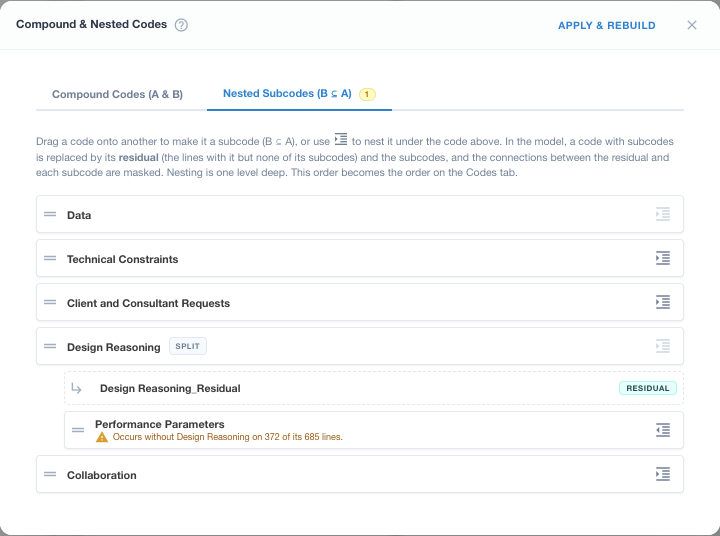
The Nested Subcodes tab lists your codes, like the Codes tab.
- To make a code a subcode, drag it by its handle onto the code it belongs under (a Drop here box shows under each code it can go under), or click its indent icon to nest it under the code above.
- A subcode's outdent icon moves it back out.
A code with subcodes is split. In the model it is replaced by its subcodes and a residual code, A_Residual, for the lines with A but none of its subcodes. The residual is listed first under its parent; click its name to rename it.
| Line | A | B | C | A_Residual |
|---|---|---|---|---|
| 1 | 1 | 1 | 0 | 0 |
| 2 | 1 | 0 | 0 | 1 |
| 3 | 1 | 0 | 1 | 0 |
| 4 | 0 | 1 | 0 | 0 |
Here B and C are nested under A. The connections between the residual and each subcode are masked. The subcodes can still connect to each other and to every other code.
Rules for nesting
- Nesting is one level deep: a subcode can't have subcodes of its own, and a code with subcodes can't be nested.
- A code used in a compound code can't also be nested. The editor marks those codes compound.
- Each subcode says on how many of its lines it occurs without its parent (line 4 above). Those lines keep the subcode but add nothing to the parent, so check that B really is part of A.
- An excluded subcode still takes its lines out of the residual.
- The order of the list becomes the order on the Codes tab, with each residual in its family's place.
A set saved with nesting the editor no longer allows (more than one level, or a subcode under two parents) opens one level deep, with a note saying what moved.
After you apply
- The new codes appear on the Codes tab like any other code. Residuals are marked RESIDUAL. You can exclude one, and it stays excluded.
- The codes they replace (A and B, or the parent A) are locked while the rule exists. To use them again, remove the rule.
- In the code masking matrix, the connections these rules mask are shaded and can't be switched back on while the rule exists. Hover one to see which rule masks it, for example residual and subcode of Design Reasoning. In ordered networks both directions are masked.
- The Methods section of the Theory & Methods write-up describes your compound and nested codes.
When the editor won't apply
The new codes are added to your data as columns, so the editor won't apply a rule that would clash. It explains what to fix if:
- a name matches a column already in your data, or another new code;
- a compound code combines a code with itself;
- a code is both in a compound code and nested.