Transmodal Analysis
Transmodal Analysis (TMA) extends ENA to data that mixes several kinds of activity, or modalities, such as spoken turns, chat messages, and log events. Each modality can have its own window length and horizon rules, because a log event and a conversation turn rarely span the same amount of context.
Turn it on with the Transmodal / Standard switch on the Windows or Horizons tab, then choose a Modality column on the Windows tab; the model builds once it has one. Turning transmodal off returns windows to lines.
The sample RS data set has no real modality column, so the screenshots on this page use
GameHalf(First / Second half of the game) as a stand-in. Your own data would use a column such as speaker role or event type.
Windows
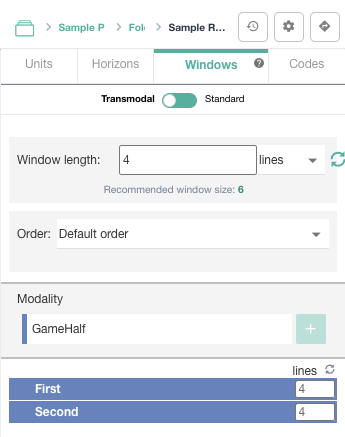
In a transmodal model, the Windows tab adds:
- Window type. Windows can be counted in lines or in time: secs, mins, hours, days, or weeks.
- Time Column (time-based windows). The column holding each line's time. Date columns are listed first.
- End Time Column (when Use end time is on in Advanced Options). Either a full end date/time, or a duration that is added to the time column.
- Modality. The column that says which modality each line belongs to. Only one modality column is allowed. Show it with the Modality switch in Advanced Options › Window.
- Ground and Response. Optional columns that further qualify how lines connect. Show them with the Show Ground and Show Response switches.
- The window tree. Each modality (and, below it, each value) has its own window length, and optionally a weight when Show Connection Weights is on. The reset icon returns them to the default.
Horizons
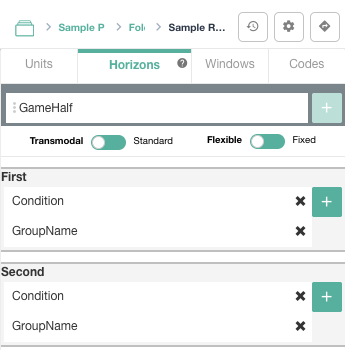
Transmodal models choose between two kinds of horizon on the Horizons tab:
- Fixed. One set of horizon columns applies to every modality, as in a standard model.
- Flexible. Each modality gets its own horizon columns. Choose the modality column with + at the top of the Horizons tab; a section appears for each of its values, and you add that value's horizon columns there. A line's modality decides which rule applies to it. Switching back to Fixed clears the per-modality assignments.
With flexible horizons, the plot checklist asks you to assign a horizon to each modality, and the plot legend shows each modality's horizon.