Simplify Model (PRIA)
Simplify Model uses PRIA (Parsimonious Removal with Interpretive Alignment) to find codes that add little to the model.
PRIA tries removing every combination of up to three codes. For each one it rebuilds the model without those codes and checks that the simpler model still matches the original: the goodness of fit on the first two dimensions must stay within the threshold of the full model's, and the points and remaining nodes must stay in the same places. Of the combinations that pass, it keeps the one that removes the most codes.
Running it
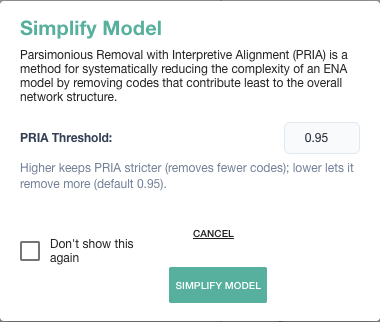
- Open Advanced Options and click Simplify Model (PRIA).
- Set the PRIA Threshold (0.80–0.99, default 0.95). This is how closely the simplified model must match the original; 0.95 means it keeps at least 95% of the original goodness of fit. Higher is stricter and removes fewer codes; lower lets PRIA remove more.
- Click Simplify Model.
When it finishes, webENA tells you which codes were removed (by their original names) and excludes them on the Codes tab, so the model is rebuilt without them. If nothing can be removed without losing fit, it says so and leaves the model unchanged. To undo, include the codes again on the Codes tab.
Requirements
- More than three included codes, since a model needs at least three.
- PRIA works on standard, means-rotated, regression-rotated, and ordered models, with the same weighting and connection mask as your model.
- A rotation borrowed with Use Rotation Matrix From can't rotate the simplified models, so PRIA scores them with the set's own rotation.